


Sprout - AI Job Search
4.4660.00 Reviews
App Specs
- Version
- 2.0.13
- Updated On
- License
- Free
- Downloads
- 100,000+
- Developer
- Magnifex
- Categories
- Business
- Platform
- Android
Screenshots
 Analysis by AppCompare
When I evaluate a job-search app, I look beyond how many listings it can show me. The more personal the recommendations and application tools become, the more I want to understand what I’m choosing to share and how much control I have over the process. Sprout - AI Job Search is designed to bring several parts of a job hunt together, so I’d approach it as a useful workspace rather than a shortcut to an offer.
A focused tool for a busy search
Sprout is a free business app from Magnifex, with optional in-app purchases ranging from $4.99 to $124.99 per item. It has a 4.5 average from around 41,000 ratings and over 100,000 installs. The app is rated for Everyone, and version 2.0.6 requires Android 8.0 or later. Those details make it easy to see that people are using it, but popularity alone can’t tell you whether its approach fits your search. That depends on how much you value having recommendations, application preparation, and job-tracking habits in one place.
I’d consider it most useful when I’m exploring roles and need help turning a broad search into a more deliberate one. It may be less suitable if I already have a narrow list of employers, prefer to manage every application in my own spreadsheet, or don’t want to build a profile in a job-search app. In those cases, a general job board or a simple document could be a better fit.
Trust starts with what you can see
With any app that asks about work history and career preferences, I take a moment to read each screen rather than rushing through setup. I’d enter only information that helps me assess the service and its recommendations, and I’d pause before sharing details that feel more personal than necessary. A profile can make job suggestions more relevant, but it also makes the initial setup a meaningful choice, not just a formality.
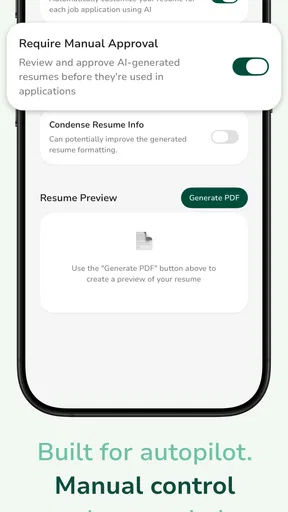
I also separate visible choices from assumptions. A polished interface or an AI label doesn’t, on its own, tell me how information is handled. I look for clear explanations in the app and make decisions based on what I can actually read there. Before using any employer-contact feature, I’d check what action sends a message, what details it includes, and whether I can review the text first. That small pause helps keep a job search intentional, especially when I’m contacting people in my current industry.
Keep control of the application process
Job hunting can involve a lot of sensitive context: employment dates, career plans, salary expectations, and the fact that I may be looking while still employed. I’d avoid putting confidential workplace information into a profile or message, and I’d keep a separate copy of every resume and application I submit. That gives me a reliable record if I later change apps or want to tailor a document for a different role.
Notifications are most helpful when they support a routine instead of dictating one. I’d use them as prompts to review new matches, then compare each listing with my own criteria before responding. A relevant suggestion is a starting point, not a guarantee that the role is current, suitable, or worth applying to. Keeping that distinction in mind makes AI recommendations easier to use without handing over the decision.
Worth Reading Before You Choose

Flipboard Shows What News Apps Must Do Beyond the Feed

Switching to Android Auto Means Rethinking Your Driving Routine

Google Calendar Makes a Crowded Week Easier to Manage

Ludo King Makes the Most of the Minutes Between Plans

Baby Panda World Brings Quick Play to Modern Phones, but Its Game Library Feels Busy

ESPN’s Live Game View Makes Following Close Games Easier
Getting Started with Sprout
First things first, downloading Sprout - AI Job Search was a breeze. It’s available for both Android and iOS, which is super convenient. Once I had it installed, I was greeted with a clean and modern interface. The design is intuitive, so I didn’t feel overwhelmed navigating through it.
The setup was pretty straightforward. The app asked me to fill out my profile with details like my professional experience, skills, and preferences. It kind of felt like setting up a dating profile, but for jobs! The cool part is that it uses AI to tailor job recommendations based on your inputs. It’s like having a personal assistant who knows exactly what you’re looking for.
Features That Stand Out
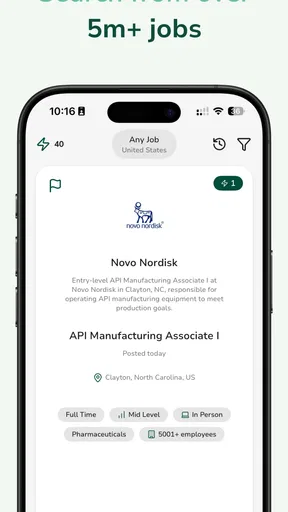
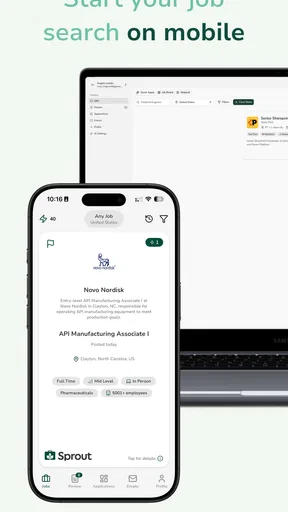
What really caught my attention were the features that make Sprout stand out from other job search apps. The AI-driven job recommendations are spot-on. I was pleasantly surprised by how relevant the job listings were. It’s like the app could read my mind or something!
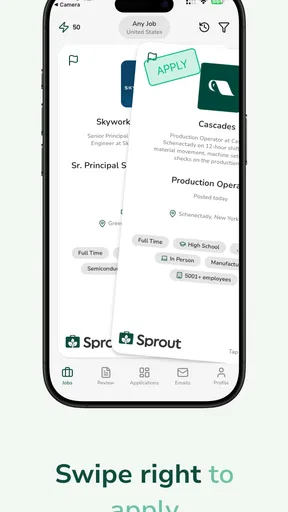
Another feature I loved is the real-time notifications. I got instant alerts whenever a new job matching my criteria popped up. No more endless scrolling or worrying about missing out on the perfect opportunity. Plus, you can save jobs and come back to them later, which is super handy for those of us who like to keep our options open.
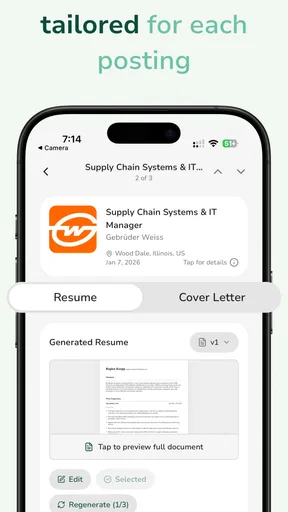
The app also offers resume tips and interview preparation advice. It’s like having a mentor right there to guide you through the process. I found the resume templates particularly useful—they’re designed to help your application stand out in a crowded field.
Connecting with Employers
Now, let’s talk about networking. Sprout has this awesome feature that allows you to connect directly with employers. It’s like having LinkedIn and a job search app rolled into one. I was able to chat with potential employers and get insights into the company culture before even applying. This feature really sets it apart by making the job search feel more personal and interactive.
I also appreciated the company reviews section. It’s always helpful to hear from others who have worked there before making a decision. The insights were candid and gave me a better understanding of what to expect from potential employers.
Using its tools with a clear plan
A practical way to get value from the recommendations is to start with a profile that reflects the roles I would genuinely accept, not every possible job title I’ve ever considered. If my preferences are too broad, a stream of plausible but irrelevant listings can become noise. If they’re too narrow, I could miss adjacent roles that use the same skills. I’d begin with a realistic target, review the first suggestions, then adjust my preferences in small steps rather than rewriting everything at once.
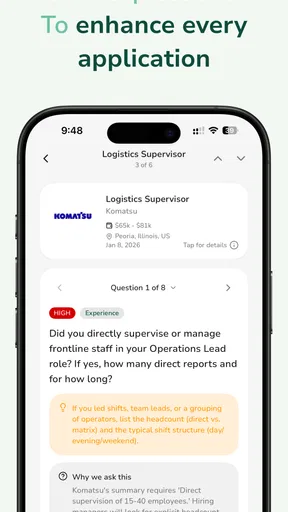
For example, imagine I have a short break between errands and want to make progress without applying hastily. I can check a notification, save a promising opening, and return to it later when I have time to compare the responsibilities with my experience. Before submitting anything, I’d use the resume guidance as a checklist: does the document make the most relevant experience easy to find, and does it speak to this role rather than every role? That workflow turns quick browsing into a considered application.
Saved jobs are also more useful when I treat them as a shortlist, not a promise to apply. I’d revisit each one and note what still needs checking, such as whether the location and responsibilities suit me or whether I need a different resume version. That extra review is especially valuable when several listings look similar at first glance. It prevents the convenience of saving a job from quietly becoming a pile of stale possibilities.
Where it differs from familiar options
Compared with using a broad job board, Sprout’s appeal is the combination of tailored suggestions and practical preparation tools. A conventional board may be preferable if I want to search a large range of listings with my own filters and keep the process simple. A professional network can be stronger when maintaining industry contacts is the main goal. Sprout’s employer conversations and company reviews make it feel more connected than a listings-only tool, but I would still use judgment: a chat or review can add context, not replace checking whether a role and employer meet my needs.
It also shouldn’t replace a personal application tracker if I’m managing many opportunities. A small spreadsheet can record deadlines, contacts, interview stages, and follow-up dates in exactly the format I want. I’d use Sprout to discover and prepare, then keep my own record for anything time-sensitive. That division of labor matters because a job search can stretch across several weeks, and relying on memory or notifications alone is an easy way to lose track.
Good fit, with sensible limits
The app is a stronger match for someone who wants guidance while exploring a career move, especially if resume feedback and interview preparation are welcome alongside job discovery. It may also help a first-time applicant who wants prompts for presenting experience more clearly. Someone who already knows exactly where to apply, wants no AI-based recommendations, or is uncomfortable creating a career profile may be better served by direct employer career pages and their own documents.
I’d treat the optional purchases as a reason to be attentive during use. The app is free to start, but paid items can range from a few dollars to more substantial amounts. Before choosing any purchase, I’d make sure I understand what it offers and whether it solves a real problem in my search; the fact that a tool is available doesn’t mean I need it. For a focused search, it’s worth first seeing whether the free experience supports the routine I want.
Questions about account settings and information controls are best answered by reading the choices presented inside the app before adding more detail or starting a conversation. I’d also review those choices again if my circumstances change, such as moving from a discreet search to an active one. That isn’t a reason to avoid the app; it’s a sensible habit whenever career information is involved. My own rule would be to share deliberately, keep copies of important materials, and send messages only after checking their contents.
Connecting with Employers
Now, let’s talk about networking. Sprout has this awesome feature that allows you to connect directly with employers. It’s like having LinkedIn and a job search app rolled into one. I was able to chat with potential employers and get insights into the company culture before even applying. This feature really sets it apart by making the job search feel more personal and interactive.
I also appreciated the company reviews section. It’s always helpful to hear from others who have worked there before making a decision. The insights were candid and gave me a better understanding of what to expect from potential employers.
Final Thoughts
Overall, my experience with Sprout - AI Job Search has been pretty stellar. It’s user-friendly, efficient, and packed with features that genuinely make the job hunting process smoother. Whether you’re just starting out or looking for a career change, this app is like having a secret weapon in your job search arsenal.
So, if you’re in the market for a new job and want something that feels less like a chore and more like an adventure, give Sprout a try. It might just be the tool you need to land that dream job. Happy job hunting!
Pros
- Intuitive interface for easy navigation.
- AI-driven recommendations improve job matching.
- Wide range of job listings available.
- Personalized alerts keep you updated.
- Simple application process within the app.
Cons
- Limited to major cities
- missing rural options.
- Occasional lag in loading job details.
- In-app ads can be distracting.
- Profile setup can be time-consuming.
- Some features require a premium upgrade.
FAQs for Sprout - AI Job Search
What is Sprout - AI Job Search?
Sprout - AI Job Search is an innovative mobile application designed to streamline the job hunting process using advanced artificial intelligence algorithms. It personalizes job recommendations based on your skills, preferences, and career goals, making it easier to find suitable employment opportunities quickly and efficiently.
How does the AI in Sprout enhance the job search experience?
Sprout's AI technology analyzes your resume, search history, and preferences to provide tailored job suggestions. It continuously learns from your interactions to improve its recommendations, ensuring that you receive the most relevant job listings tailored to your unique career aspirations.
Is Sprout - AI Job Search free to use?
Sprout offers a free version with basic features, allowing users to explore job listings and receive recommendations. For a more comprehensive experience, including advanced filtering options and personalized support, a premium subscription is available at a competitive price.
Can I apply for jobs directly through the app?
Yes, Sprout allows you to apply for jobs directly within the app. It provides an integrated platform where you can submit your resume and cover letter, track application statuses, and receive notifications about your applications, making the entire process seamless and convenient.
Does Sprout - AI Job Search protect user data?
Absolutely, Sprout prioritizes user privacy and data protection. It employs robust security measures to ensure your personal information and job search activities remain confidential. All data is encrypted and stored securely, adhering to industry standards and regulations to maintain user trust.


